UE5 project folder structure and organization best practices
Organize by feature, not by type — that’s the single strongest consensus across Epic’s own samples, the Allar style guide (6,000+ GitHub stars), and professional studios. Unreal Engine 5 projects that group assets by game domain (Characters/, Weapons/, Vehicles/) scale far better than those sorted by asset type (Meshes/, Textures/, Materials/). This matters because a poorly organized UE5 project becomes nearly unmanageable past a few hundred assets, and restructuring later generates cascading redirectors that can break references across your entire project. Epic’s Lyra Starter Game demonstrates the most advanced version of this philosophy: shared assets live in a feature-based Content/ folder, while gameplay features are fully encapsulated in modular Game Feature Plugins. For indie developers, the practical takeaway is to start with a clean feature-based folder structure inside a project namespace folder, adopt standard naming prefixes from day one, and never move assets outside the Content Browser.
Epic’s official project layout and recommendations
Every UE5 project follows a standard top-level directory structure that the engine generates automatically:
MyProject/
├── Binaries/ # Compiled executables and DLLs
├── Build/ # Platform-specific build files
├── Config/ # .ini configuration files
├── Content/ # All game assets — the heart of your project
├── DerivedDataCache/ # Cached derived data (do not commit to source control)
├── Intermediate/ # Temp build files, compiled shaders
├── Platforms/ # Platform-specific config overrides
├── Plugins/ # Project-specific plugins
├── Saved/ # Auto-saves, logs, crash reports
├── Source/ # C++ source code modules
└── MyProject.uproject
Epic’s official “Recommended Asset Naming Conventions” documentation establishes the naming pattern
[TypePrefix]_[BaseName]_[Descriptor]_[OptionalVariant] — for example, SM_Rock_Desert_01 or T_Character_Hero_N. This convention appears consistently across Epic's own sample projects, including the In-Camera VFX Production Test and Lyra. Epic also maintains a dedicated "Assets Folder Structure" documentation page with visual diagrams of their recommended Content Browser organization, built around the principle of logical grouping rather than type-based sorting.For the Content/ folder itself, Epic does not prescribe a single mandatory structure. Instead, their documentation and sample projects demonstrate a consistent pattern: a top-level project namespace folder containing feature-oriented subfolders. The Allar/Gamemakin style guide, which Epic’s own community tutorials reference, codifies this as a firm rule — all project assets belong inside
Content/ProjectName/ to prevent namespace collisions during asset migration.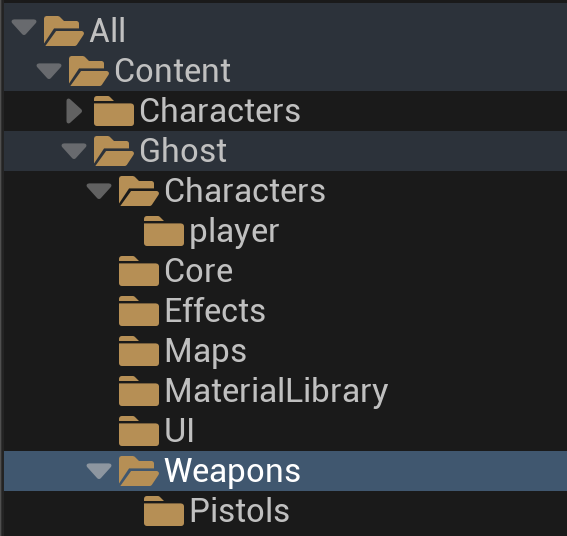
How Lyra organizes Epic’s most important UE5 sample
Lyra is Epic’s flagship UE5 sample project, and its architecture reveals how Epic thinks about project organization at scale. The structure splits into two distinct layers: shared assets in Content/ and gameplay features in Game Feature Plugins.
The Content/ folder uses a hybrid organization that leans feature-based at the top level:
Content/
├── Audio/
├── Characters/
│ └── Heroes/Mannequin/Animations/
├── ContextEffects/
├── Effects/
│ ├── Camera/
│ ├── NiagaraModules/
│ └── Particles/
├── Environments/
├── Feedback/
├── GameplayCueNotifications/
├── GameplayEffects/
├── Input/
├── System/Experiences/
├── UI/Indicators/
└── Weapons/
The real architectural innovation lives under
Plugins/GameFeatures/, where each gameplay mode is a self-contained plugin with its own Content, Config, and optionally Source directories:Plugins/GameFeatures/
├── ShooterCore/ # Base shooter framework
│ ├── Content/
│ │ ├── Experiences/ # Experience definitions + action sets
│ │ ├── Game/ # Player pawn (B_Hero_ShooterMannequin)
│ │ └── UserInterface/HUD/
│ └── ShooterCore.uplugin
├── ShooterMaps/ # Maps extending ShooterCore
│ └── Content/
│ ├── L_Expanse
│ └── L_Convolution_Blockout
└── TopDownArena/ # Entirely different genre — top-down party game
├── Content/Game/
└── TopDownArena.upluginLyra’s “Experiences” system is modular by design. When a player selects Team Deathmatch in the lobby, only ShooterCore and ShooterMaps plugins load. The TopDownArena plugin stays dormant. Each plugin mounts its own content path —
Plugins/GameFeatures/TopDownArena/Content/ becomes /TopDownArena/ in the asset registry. This architecture, called Modular Game Features, powers Fortnite's constantly rotating content and represents Epic's vision for scalable UE5 projects.Lyra also introduces distinctive naming prefixes that differ from older community conventions:
B_ for general Blueprints (instead of BP_), W_ for Widget Blueprints (instead of WBP_), LAS_ for Lyra Action Sets, and L_ for levels. This trend toward shorter prefixes reflects UE5's evolving conventions.
The Allar style guide and community standards
The Allar/Gamemakin UE5 Style Guide on GitHub is the de facto community standard, with over 6,000 stars and 1,200 forks. Its core philosophy is that “all structure, assets, and code should look like a single person created it.” A v2 branch targeting UE5-specific conventions is under active development, and an automated Linter plugin is available on the Marketplace.
The guide’s recommended folder structure uses a GenericShooter example:
Content/GenericShooter/
├── Art/
│ ├── Industrial/ (Ambient, Machinery, Pipes)
│ ├── Nature/ (Foliage, Rocks, Trees)
│ └── Office/
├── Characters/
│ ├── Bob/
│ ├── Common/ (shared Animations, Audio)
│ ├── Jack/
│ └── Zoe/
├── Core/ (GameModes, base Characters, Interactables)
├── Effects/ (Electrical, Fire, Weather)
├── Maps/ (Campaign1, Campaign2)
├── MaterialLibrary/ (shared master materials, Debug, Metal, Utility)
└── Weapons/
 ├── Common/
 ├── Pistols/DesertEagle/
 └── Rifles/
The guide’s most critical rules for folder organization are:
- Always use a top-level project folder (
Content/ProjectName/) — no assets should live at the Content root - Never create type-based folders like
Meshes/,Textures/, orMaterials/— prefixes and Content Browser filtering handle type identification - Use PascalCase for all folder names, never spaces or special characters
- Keep a
Developers/folder for personal sandboxing (hidden by default in the Content Browser) MaterialLibrary/holds shared master materials and utility textures used across featuresCore/contains critical base classes — GameMode, PlayerController, base Character
Tom Looman’s naming guide, another widely referenced resource, largely aligns with Allar’s recommendations but uses
SM_ for static meshes (versus Allar's S_), Widget_ instead of WBP_, and organizes Enhanced Input assets in a dedicated Input/ folder. His structure adds explicit AI/, Audio/, and Actions/ (for Gameplay Ability System) top-level folders.
Asset naming conventions across all major guides
The naming pattern
Prefix_BaseName_Variant_Suffix is universal. Below is a consolidated comparison of the most common prefixes across the four major sources — pick one column and stay consistent:Asset Type Allar Guide Tom Looman Lyra (Epic) Most Common Blueprint BP_ BP_ B_ BP_ Widget Blueprint WBP_ Widget_ W_ WBP_ Static Mesh S_ SM_ SM_ SM_ Skeletal Mesh SK_ SK_ SK_ SK_ Material M_ M_ M_ M_ Material Instance MI_ MI_ MI_ MI_ Material Function MF_ MF_ — MF_ Texture T_ T_ T_ T_ Niagara System — NS_ NS_ NS_ Animation Blueprint ABP_ ABP_ ABP_ ABP_ Animation Montage AM_ AM_ — AM_ Sound Wave A_ S_ — S_ MetaSound Source — MSS_ — MSS_ Data Table DT_ — — DT_ Input Action — IA_ IA_ IA_ Input Mapping Context — IMC_ IMC_ IMC_ Level/Map — — L_ L_ Gameplay Ability — — GA_ GA_ Gameplay Effect — — GE_ GE_ Behavior Tree BT_ — — BT_ Blackboard BB_ — — BB_ Particle System (Cascade) PS_ — — PS_ Physics Asset PHYS_ PHYS_ — PHYS_
Texture suffixes are highly consistent across all guides:
Channel Suffix Notes Base Color / Diffuse _D Universal Normal _N Universal Roughness _R Universal Metallic _MT or _M _MT avoids collision with Mask Emissive _E Universal Ambient Occlusion _AO or _O Both common Alpha / Opacity _A Allar convention Height / Displacement _H Community Wiki
When packing multiple channels into one texture (common for optimization), the Allar guide recommends stacking suffix letters:
T_Rock_ORM means Occlusion (R channel), Roughness (G channel), Metallic (B channel). UE5's trend is toward shorter prefixes — Lyra uses B_ and W_ where older guides use BP_ and WBP_. For indie developers starting fresh, the shorter Lyra-style prefixes are a reasonable choice, but BP_ and SM_ remain the most widely recognized across the community.
Asset redirectors: the hidden tax on reorganization
A redirector is a lightweight
.uasset file that Unreal Engine creates at an asset's old location whenever you move or rename it in the Content Browser. It stores exactly one thing: the new path. When any unsaved Blueprint, level, or material tries to load the asset from the old path, the redirector transparently forwards the reference. Redirectors are invisible by default in the Content Browser, which is precisely why they become dangerous — they accumulate silently.What creates redirectors: Moving or renaming any asset in the Content Browser. Critically, moving files via Windows Explorer, macOS Finder, or
git mv creates no redirector and immediately breaks all references. This is the single most common mistake indie developers make.How to fix them: Right-click any folder in the Content Browser and select “Fix Up Redirectors in Folder” (renamed to “Update Redirector References” in UE 5.4+). This scans every
.uasset and .umap that references the old path, updates each reference to the new path, re-saves those files, and deletes the redirector. For large-scale cleanup, a command-line option exists: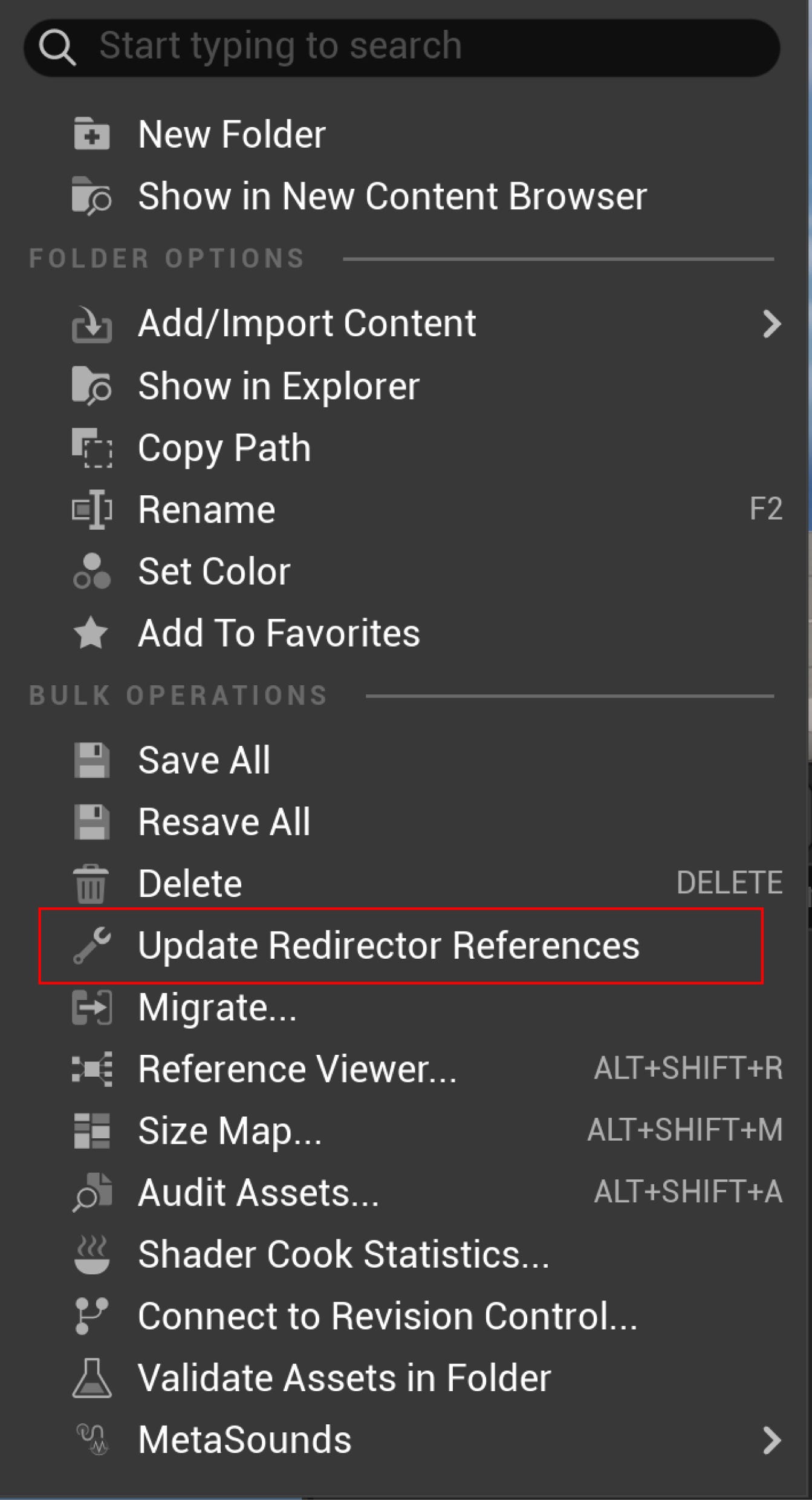
UnrealEditor.exe MyProject.uproject -run=ResavePackages -fixupredirects -autocheckout -projectonly -unattendedThe most common pitfalls are straightforward but painful. If you rename asset A to B and then create a new asset named A, the editor throws an error because a redirector named “A” still exists. If you delete an asset that a redirector points to, you get a dangling reference with silent failures. If a team member has a referencing file locked in source control, the fix-up cannot complete, and the redirector persists.
For indie teams using Git, the practical workflow is: always use Git LFS for
.uasset files, move assets in small batches (not the entire project at once), fix redirectors immediately after each batch, and commit everything — the moved asset, updated references, and deleted redirector — in one atomic commit. Never rename folders directly; instead, create a new folder, move assets into it, then delete the empty old folder. This avoids generating a redirector for every asset inside the original folder.
By-feature wins, but hybrids dominate in practice
The debate between by-type organization (
Meshes/, Textures/, Materials/) and by-feature organization (Characters/, Weapons/, Environments/) has a clear winner in the UE5 community. Every major style guide recommends feature-based organization, and the Allar guide explicitly labels type-based folders as redundant because "asset types are already both sorted by prefix as well as able to be filtered in the Content Browser."By-type fails at scale because a single character’s assets scatter across five or more root folders — its mesh in
Meshes/, textures in Textures/, materials in Materials/, Blueprint in Blueprints/, animations in Animations/. Migrating that character to another project means hunting through every folder. By-feature keeps everything together: Characters/Player/ contains all assets for the player character, making migration, deletion, and team ownership trivial.In practice, most studios use a hybrid. Feature-based organization dominates the top level, but very large asset collections within a feature (100+ animations, dozens of audio files) get type sub-folders. A typical professional structure looks like:
Content/MyGame/
├── Characters/
│ └── Player/
│ ├── Animations/ ← Type sub-folder for large sets
│ ├── Audio/
│ ├── BP_PlayerCharacter.uasset
│ ├── SK_Player.uasset
│ └── M_Player.uasset
├── Weapons/
│ ├── Common/
│ └── Pistols/DesertEagle/
├── Core/ ← Shared gameplay systems
├── MaterialLibrary/ ← Shared master materials
├── Maps/
├── UI/
└── Effects/
Lyra takes this further by making features into standalone plugins. For indie developers, this level of modularity is unnecessary at the start — but the mental model is valuable. Begin with feature-based Content folders. If a feature grows complex enough to warrant isolation, promote it to a Game Feature Plugin. The progression from flat feature folders to modular plugins is the natural scaling path in UE5.
Team size matters for the choice. Solo developers and small teams (1–5 people) benefit from a simple, flat feature structure capped at 3–4 folder levels deep. Large teams (10+) need the isolation that plugins provide, because separate plugin content directories eliminate merge conflicts between artists working on different features.
What changed in UE 5.4 and 5.5 for project organization
UE 5.4 and 5.5 focused more on backend infrastructure than Content Browser UI overhauls, but several changes directly affect project organization workflows.
UE 5.4 (April 2024) introduced Zen Storage as a local Derived Data Cache, replacing the old loose-file DDC with a more performant content-addressable storage system. This speeds up editor loading and Play-In-Editor iteration, reducing the friction of working with large, well-organized projects. Multi-Process Cook became production-ready, leveraging multiple CPU cores for significantly faster packaging. The Content Browser gained spacebar previewing — pressing spacebar on a selected asset shows an instant preview, making it faster to identify assets without relying solely on naming conventions. A new batch renaming tool appeared in the Motion Design World Outliner, useful for scene organization.
UE 5.5 (November 2024) brought the most organization-relevant change: Fab marketplace integration directly into the Content Browser. Fab replaced the old Unreal Marketplace and Sketchfab Store, letting developers drag individual assets (including Quixel Megascans) directly into scenes. This creates a new organizational challenge — downloaded Fab content needs isolation in a folder like
Content/External/ or Content/Fab/ to prevent namespace pollution. The Zen Loader became production-ready and enabled by default, optimizing asset loading through precomputed dependency graphs and new .utoc/.ucas container files. Zen Storage as a Shared DDC also reached production status, enabling distributed teams to share cached data efficiently.The redirector workflow received a minor but notable change: the context menu option was renamed from “Fix Up Redirectors in Folder” to “Update Redirector References” starting in 5.4, which has caused some confusion among developers searching for the old name.
Conclusion
The strongest practical advice for an indie developer starting a UE5 project distills to five decisions made on day one. First, create a top-level namespace folder (
Content/MyGame/) and never place assets at the Content root. Second, adopt feature-based folders (Characters/, Weapons/, Maps/) with type sub-folders only for large asset collections like animations. Third, pick a naming prefix standard — SM_, M_, T_, BP_ with texture suffixes _D, _N, _R — and enforce it without exception. Fourth, always move and rename assets inside the Content Browser, fix redirectors immediately, and commit the results atomically. Fifth, isolate third-party content from Fab or the marketplace in a dedicated External/ folder.The deeper insight from Lyra is architectural: think of features as self-contained units from the start, even if you don’t use Game Feature Plugins yet. If every asset related to “Weapons” lives under
Weapons/ and every asset related to "Characters" lives under Characters/, you've built a project that can scale from a solo prototype to a multi-team production without restructuring. The folder structure isn't just organization — it's an expression of your game's architecture.
This article is part of our UE5 systems series for indie developers. We cover these tools the way we wish someone had explained them to us — with honest tradeoffs, specific numbers, and none of the marketing fluff.